
Working with results#
For all example code on this page, ospgrillage is imported as og
import ospgrillage as og
Extracting results#
After analysis, results are obtained using
get_results().
all_result   = example_bridge.get_results()
patch_result = example_bridge.get_results(load_case="patch load case")
The first call returns results for every load case; the second filters to one.
What is an xarray Dataset?#
The returned object is an xarray Dataset — think of it as a multi-dimensional, labelled table. Rather than accessing data by integer index (row 3, column 7), you access it by name (Loadcase="Barrier", Component="Mz_i"). This makes result queries self-describing and much less error-prone.
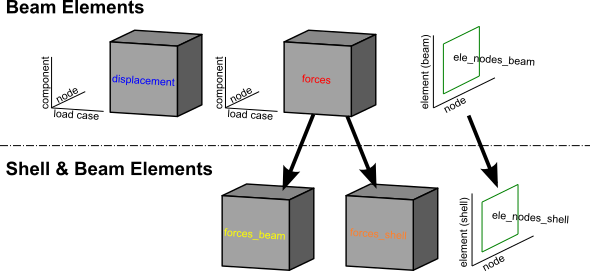
The Dataset contains five named data variables:
Variable |
Axes (dimensions) |
Contents |
|---|---|---|
|
Loadcase x Node x Component |
Translations (x, y, z) and rotations (theta_x, theta_y, theta_z) at each node |
|
Loadcase x Node x Component |
Velocities (dx, dy, dz) and angular velocities (dtheta_x/y/z) |
|
Loadcase x Node x Component |
Accelerations (ddx, ddy, ddz) and angular accelerations |
|
Loadcase x Element x Component |
Internal forces (Vx, Vy, Vz, Mx, My, Mz) at each element end (_i, _j) |
|
Element x Nodes |
Which node tags (i, j) belong to each element |
For a Shell & Beam Elements — shell_beam, forces are split into forces_beam / forces_shell
and element connectivity into ele_nodes_beam / ele_nodes_shell.
Additionally, stresses_shell (Loadcase x Element x Stress) contains
shell section stress resultants at 4 Gauss points — 8 components per
point (N11, N22, N12, M11, M22, M12, Q13, Q23) giving 32 values per
element. See Shell contour plots (plot_srf) for visualisation.
Printing all_result shows the structure:
<xarray.Dataset>
Dimensions:        (Component: 18, Element: 142, Loadcase: 5, Node: 77, Nodes: 2)
Coordinates:
  * Component      (Component) <U7 'Mx_i' 'Mx_j' 'My_i' ... 'theta_y' 'theta_z'
  * Loadcase       (Loadcase) <U55 'Barrier' ... 'single_moving_point at glob...'
  * Node           (Node) int32 1 2 3 4 5 6 7 8 9 ... 69 70 71 72 73 74 75 76 77
  * Element        (Element) int32 1 2 3 4 5 6 7 ... 136 137 138 139 140 141 142
  * Nodes          (Nodes) <U1 'i' 'j'
Data variables:
    displacements  (Loadcase, Node, Component) float64 nan nan ... -4.996e-10
    forces         (Loadcase, Element, Component) float64 36.18 -156.9 ... nan
    ele_nodes      (Element, Nodes) int32 2 3 1 2 1 3 4 ... 32 75 33 76 34 77 35
Each line of Coordinates lists the labels along one dimension. Loadcase lists
every load case name; Component lists every result quantity; Node and Element
list the integer tags from the OpenSees model.
Figure 1 illustrates the overall dataset structure.
Extracting the data variables#
disp_array = all_result.displacements  # nodal displacements & rotations
force_array = all_result.forces        # element end forces
ele_array   = all_result.ele_nodes     # element->node connectivity
Available force and displacement components#
Each DataArray has its own Component coordinate. To see the labels:
disp_array.coords['Component'].values
# array(['x', 'y', 'z', 'theta_x', 'theta_y', 'theta_z'])

force_array.coords['Component'].values
# array(['Vx_i', 'Vy_i', 'Vz_i', 'Mx_i', 'My_i', 'Mz_i',
#        'Vx_j', 'Vy_j', 'Vz_j', 'Mx_j', 'My_j', 'Mz_j'])
Suffix _i / _j denotes the start / end node of the element respectively.
Selecting results by label#
Use xarray’s .sel() to pick results by name, and .isel() to pick by integer position:
# All nodes, one component — vertical displacement
disp_array.sel(Component='y')

# One load case, one node
disp_array.sel(Loadcase="patch load case", Node=20)

# One load case, several elements
force_array.sel(Loadcase="Barrier", Element=[2, 3, 4])

# One component across all load cases
force_array.sel(Component='Mz_i')
For results from a Moving load, each increment is stored as a separate load case
named automatically as "<load name> at global position [x,y,z]". You can select
these by full name or by position:
# Select by the auto-generated name
by_name  = force_array.sel(Loadcase="patch load case at global position [0,0,0]")
# Select by integer index (0 = first increment)
by_index = force_array.isel(Loadcase=0)
Influence lines and surfaces#
Influence studies are created through
analyze_influence_lines() and
analyze_influence_surfaces(),
which return durable result objects. Those objects carry the compiled
Dataset, can be plotted directly, and can be saved later without recomputing:
ils = bridge.analyze_influence_lines(
    paths={"Lane 1": lane_1_path, "Lane 2": lane_2_path}
)
ils.plot(array="forces", component="Mz_i", element=42)
ils.plot(array="forces", component="Mz_i", element=42, backend="plotly", view="path")
ils.save("lane_ils.nc")

iss = bridge.analyze_influence_surfaces(x=[2, 4], z=[2, 3], name="Deck IS")
iss.plot(array="forces", component="Mz_i", element=42, view="surface3d")

# Station-space reduction (recommended for skewed/curved decks)
iss.plot(
    array="forces",
    component="Mz_i",
    element=42,
    x_coord="longitudinal_station",
    y_coord="transverse_station",
)
CSV export is available directly from the result objects:
# IL: one long-form CSV containing all lanes/paths
ils.to_csv(
    "lane_ils.csv",
    array="forces",
    component="Mz_i",
    element=42,
    load_coord="x",
)

# IS: rectangular station-grid CSV of ordinates
# (+ optional companion point map with physical x/z)
iss.to_csv(
    "deck_is_grid.csv",
    array="forces",
    component="Mz_i",
    element=42,
    include_physical_coords=True,
)
By default, influence surfaces are generated from the mesh station grid
(admissible deck points). For curved or skewed bridges, reduce in station
space with x_coord="longitudinal_station" and
y_coord="transverse_station" to avoid rectangular-grid assumptions.
When plotting a reduced surface, plot_is(..., coordinate_space="physical")
uses mapped deck coordinates (x, z) and triangulates valid points so the
surface remains contiguous on curved geometry in both Matplotlib and Plotly.
Use coordinate_space="station" to keep station axes.
The lower-level helpers
create_influence_line(),
create_influence_surface(),
plot_il(), and
plot_is() remain available when direct
xarray manipulation is preferred.
Influence lines support both the traditional view="ordinate" plot and a
view="path" mode that draws the ordinates along the load path on top of the
bridge model.
Technical notes (DKT and station mapping)#
shape_function="hermite"uses the higher-order consistent-load path: Hermite interpolation on quadrilateral regions, and a DKT-style condensed triangular distributor where skew geometry creates 3-node regions.Influence-line
load_coord="station"is cumulative distance along each axle path; this is typically preferred for skewed/curved paths because globalxis not a uniform path-abscissa there.Influence-surface default generation uses admissible mesh station points (not a global rectangular deck bounding box), then stores both station coordinates and mapped physical (
x,z) coordinates.Physical plotting (
coordinate_space="physical") triangulates valid mapped points so curved/skewed surfaces remain contiguous without assuming a rectangular Cartesian deck.
For a complete workflow, see the Influence Lines and Surfaces tutorial notebook.
Note
For information on the full range of indexing and selection operations available on DataArrays, see the xarray indexing documentation.
Load combinations#
Load combinations are computed on the fly in
get_results() by passing a combinations
dictionary: keys are load case name strings and values are load factors.
ospgrillage multiplies each load case by its factor and sums the results.
comb_dict   = {"patch_load_case": 2, "moving_truck": 1.6}
comb_result = example_bridge.get_results(combinations=comb_dict)
print(comb_result)
<xarray.Dataset>
Dimensions:        (Component: 18, Element: 142, Loadcase: 3, Node: 77, Nodes: 2)
Coordinates:
  * Component      (Component) <U7 'Mx_i' 'Mx_j' 'My_i' ... 'theta_y' 'theta_z'
  * Node           (Node) int32 1 2 3 4 5 6 7 8 9 ... 69 70 71 72 73 74 75 76 77
  * Element        (Element) int32 1 2 3 4 5 6 7 ... 136 137 138 139 140 141 142
  * Nodes          (Nodes) <U1 'i' 'j'
  * Loadcase       (Loadcase) <U55 'moving_truck at global position [2...'
Data variables:
    displacements  (Loadcase, Node, Component) float64 nan nan ... 0.0 7.688e-05
    forces         (Loadcase, Element, Component) float64 36.18 -156.9 ... nan
    ele_nodes      (Loadcase, Element, Nodes) int32 6 9 3 6 ... 228 102 231 105
When a combination mixes static and moving load cases, the factored static load case is added to each increment of the moving load.
Load envelopes#
A load envelope finds the maximum (or minimum) of a chosen result component across
all load cases. Use create_envelope() to build an
Envelope object, then call .get():
envelope = og.create_envelope(ds=comb_result, load_effect="y", array="displacements")
disp_env = envelope.get()
print(disp_env)
By default get() returns, for each node, the maximum value of vertical
displacement y:
<xarray.DataArray 'Loadcase' (Node: 77, Component: 18)>
array([[nan, nan, nan, ...,
        'single_moving_point at global position [2.00,0.00,2.00]', ...],
       ...],
      dtype=object)
Coordinates:
  * Component  (Component) <U7 'Mx_i' 'Mx_j' 'My_i' ... 'theta_y' 'theta_z'
  * Node       (Node) int32 1 2 3 4 5 6 7 8 9 10 ... 69 70 71 72 73 74 75 76 77
For more options see create_envelope().
Saving and loading results#
Results can be saved to a NetCDF
file — the standard binary format for labelled multi-dimensional data — by
passing the save_filename keyword to
get_results():
# Save while retrieving
results = example_bridge.get_results(save_filename="my_results.nc")

# Also works with load combinations
comb = example_bridge.get_results(
    combinations={"Dead load": 1.2, "SIDL": 1.5},
    save_filename="combination_results.nc",
)
If you omit the NetCDF extension and pass a stem (for example
save_filename="my_results"), ospgrillage writes semantic names:
*.res.nc for ordinary results, *.il.nc for influence-line exports, and
*.is.nc for influence-surface exports.
This writes the full xarray Dataset — including node coordinates and
member-element connectivity — to a .nc file in the current working
directory.
Loading saved results#
To reload saved results later, use xarray directly:
import xarray as xr
reloaded = xr.open_dataset("my_results.nc")
The reloaded Dataset has the same structure (displacements, forces,
ele_nodes, etc.) so all the selection and envelope operations described
above work identically.
Plotting from a saved file#
The saved file is self-contained: it includes the node coordinates and
member mappings needed by the plotting functions. Use
model_proxy_from_results() to create a
lightweight proxy that stands in for the original grillage model:
import xarray as xr
import ospgrillage as og

ds = xr.open_dataset("my_results.nc")
proxy = og.model_proxy_from_results(ds)

# All plotting functions work with the proxy
og.plot_bmd(proxy, ds, backend="plotly")
og.plot_sfd(proxy, ds, backend="plotly")
og.plot_def(proxy, ds, backend="plotly")
og.plot_tmd(proxy, ds, backend="plotly")
Note
The proxy supports force diagrams and deflected shapes. For the full
model geometry visualisation (plot_model())
you still need the original :class:~ospgrillage.osp_grillage.OspGrillage
object.
Viewing results in the GUI#
The ospgui application can open .nc files directly via
File > Open Results (.nc) (Ctrl+O). This switches to a results viewer
with interactive BMD, SFD, TMD, and deflection tabs, plus loadcase and
member-filter controls.
To generate test .nc files for all three mesh types (Oblique, GMS,
Ortho), run::
python tests/generate_test_results.py
Plotting results#
Model visualisation#
Use plot_model() to inspect the mesh geometry
before or after analysis:
og.plot_model(bridge_28)                                     # matplotlib plan view
og.plot_model(bridge_28, backend="plotly")                   # interactive 3D
og.plot_model(bridge_28, show_node_labels=True)              # with node tags
Post-processing results#
ospgrillage includes a dedicated post-processing module for force diagrams, deflected shapes, and envelopes across multiple load cases.
Note
The post-processing module supports force diagrams and deflected shapes for
beam-based model types (beam_only and beam_link).
For this section, we refer to an exemplar 28 m super-T bridge (Figure 2). The
grillage object is named bridge_28.

To plot deflection from the displacements DataArray use
plot_def(), specifying a grillage member name:
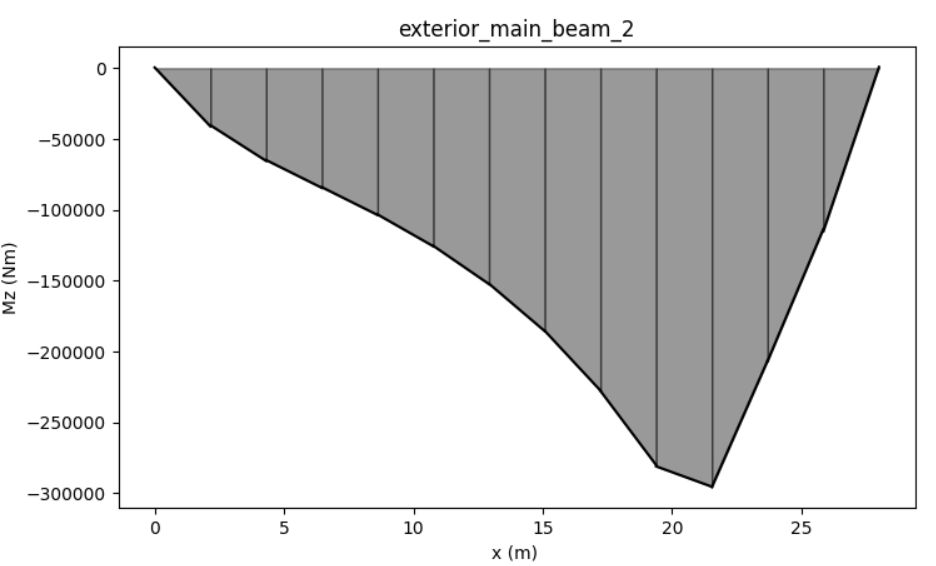
og.plot_def(bridge_28, results, members="exterior_main_beam_2")

To plot internal forces from the forces DataArray use
plot_force():
og.plot_force(bridge_28, results, member="exterior_main_beam_2", component="Mz")
Convenience plotting functions#
For the most common diagrams, convenience wrappers are provided that default to
plotting all member groups when no member is specified:
og.plot_bmd(bridge_28, results)          # bending moment diagram (Mz)
og.plot_sfd(bridge_28, results)          # shear force diagram (Fy)
og.plot_def(bridge_28, results)   # vertical deflection (y)
Each returns a list of figures (one per member group). Pass
member="interior_main_beam" to plot a single member instead.
Selecting member groups#
The member parameter accepts a string for a single member, or a
Members bitflag to plot any combination
of groups:
# Plot only longitudinal members
og.plot_bmd(bridge_28, results, member=og.Members.LONGITUDINAL, backend="plotly")

# Combine individual members with |
og.plot_bmd(bridge_28, results,
            member=og.Members.EDGE_BEAM | og.Members.INTERIOR_MAIN_BEAM,
            backend="plotly")

# Plot everything (the default for plotly)
og.plot_bmd(bridge_28, results, member=og.Members.ALL, backend="plotly")
Available individual flags:
Flag |
Member name string |
|---|---|
|
|
|
|
|
|
|
|
|
|
|
|
|
|
Pre-defined composites: LONGITUDINAL (all four longitudinal types),
TRANSVERSE (transverse slab + start/end edges), ALL (everything).
Customising plots#
All plotting functions accept keyword arguments for common customisations:
# Wide figure, values in kN*m, custom title, red with no fill
og.plot_bmd(bridge_28, results,
            member="interior_main_beam",
            figsize=(12, 4),
            scale=0.001,
            title="Bending Moment (kN*m)",
            color="r",
            fill=False)
To compose multi-panel figures, pass an existing matplotlib Axes:
import matplotlib.pyplot as plt
fig, axes = plt.subplots(1, 3, figsize=(18, 4))
og.plot_bmd(bridge_28, results, member="interior_main_beam", ax=axes[0])
og.plot_sfd(bridge_28, results, member="interior_main_beam", ax=axes[1])
og.plot_def(bridge_28, results, member="interior_main_beam", ax=axes[2], color="g")
fig.tight_layout()
The full set of keyword arguments is:
Kwarg |
Default |
Description |
|---|---|---|
|
matplotlib default |
Figure size in inches |
|
|
Existing Axes (matplotlib) or Figure (Plotly) to draw on |
|
|
Multiply values by this factor (e.g. |
|
auto |
Custom title string, or |
|
|
Line colour |
|
|
Shade the area under force diagrams |
|
|
Fill / trace transparency |
|
|
Call |
Interactive 3D plots (Plotly)#
For interactive rotation — especially useful in Jupyter notebooks — pass
backend="plotly":
pip install ospgrillage[gui] # includes plotly
og.plot_bmd(bridge_28, results, backend="plotly")
og.plot_sfd(bridge_28, results, backend="plotly")
og.plot_def(bridge_28, results, backend="plotly")
Each returns a single Plotly Figure that
renders interactively in Jupyter notebooks and in browser windows from the
terminal. The figure can be further customised using the standard Plotly
API. The GUI auto-detects plotly and uses it by default when available.
Shell contour plots (plot_srf)#
For shell_beam models, plot_srf()
renders contour plots over the shell mesh. It supports three families of
component:
Family |
Components |
Description |
|---|---|---|
Shell forces |
|
Element end forces averaged to nodes |
Displacements |
|
Nodal translations (x, y, z) |
Stress resultants |
|
Section stress resultants averaged from Gauss points |
Note
plot_srf requires a shell_beam model. The results Dataset must
contain ele_nodes_shell and node_coordinates. Stress resultant
components additionally require stresses_shell (generated automatically
by ospgrillage ≥ 0.6.0).
Basic usage#
plot_srf takes a results Dataset (not a grillage object) as its first
argument:
results = bridge.get_results(save_filename="bridge_results.nc")

# Shell bending moment about the x-axis
og.plot_srf(results, component="Mx")

# Vertical displacement contour
og.plot_srf(results, component="Dy")

# Membrane force N11 (stress resultant)
og.plot_srf(results, component="N11")
Choosing a loadcase#
By default the first loadcase is plotted. Pass loadcase= to select a
specific one:
og.plot_srf(results, component="Mx", loadcase="Dead Load")
Shell force components#
Shell element end forces (Vx–Mz) are extracted from forces_shell
and averaged at shared nodes:
og.plot_srf(results, "Mx")   # bending moment about x
og.plot_srf(results, "Vy")   # shear force in y
og.plot_srf(results, "Mz")   # torsion
Displacement components#
Displacement contours (Dx, Dy, Dz) are read directly from the
nodal displacements array:
og.plot_srf(results, "Dy")                              # vertical deflection
og.plot_srf(results, "Dy", colorscale="Viridis")        # sequential palette
Tip
Use a sequential colorscale like Viridis for displacements
(single-sign data) and a diverging colorscale like RdBu_r
(the default) for forces and stress resultants (signed data that
crosses zero).
Stress resultant components#
Shell section stress resultants are extracted via OpenSeesPy’s
eleResponse(tag, "stresses"), which returns 8 values at each of the
4 Gauss points for a 4-node shell element:
Notation |
Meaning |
|---|---|
|
Membrane force per unit length in local 1-direction |
|
Membrane force per unit length in local 2-direction |
|
In-plane shear force per unit length |
|
Bending moment per unit length about local 2-axis |
|
Bending moment per unit length about local 1-axis |
|
Twisting moment per unit length |
|
Transverse shear force per unit length in 1–3 plane |
|
Transverse shear force per unit length in 2–3 plane |
og.plot_srf(results, "M11")   # plate bending about local 2-axis
og.plot_srf(results, "N11")   # membrane force in local 1-direction
og.plot_srf(results, "Q13")   # transverse shear
Composing shell contours with beam diagrams#
A common workflow is to overlay the beam BMD/SFD on top of a shell
contour. Pass the Plotly figure returned by plot_srf as the ax=
argument to any beam plot function:
# 1. Create the shell contour (show=False to keep the figure object)
fig = og.plot_srf(results, "Mx", backend="plotly", show=False)

# 2. Create a model proxy for beam plotting
proxy = og.model_proxy_from_results(results)

# 3. Overlay the BMD onto the same figure
og.plot_bmd(proxy, results, backend="plotly", ax=fig)
This works with plot_bmd, plot_sfd, plot_tmd, and plot_def.
Colorscale guidance#
Data type |
Recommended colorscale |
Why |
|---|---|---|
Forces / moments ( |
|
Diverging — highlights sign change |
Stress resultants ( |
|
Diverging — signed data |
Displacements ( |
|
Sequential — typically single-sign |
og.plot_srf(results, "Mx", colorscale="RdBu_r")     # diverging (default)
og.plot_srf(results, "Dy", colorscale="Viridis")     # sequential
og.plot_srf(results, "N11", colorscale="Plasma")     # alternative sequential
Additional keyword arguments#
Kwarg |
Default |
Description |
|---|---|---|
|
|
|
|
|
Plotly colorscale name (or matplotlib |
|
|
Display the colour bar legend |
|
|
Surface opacity (0–1) |
|
|
Display the figure immediately |
|
|
Existing Plotly |
|
auto |
Custom title string, or |
|
|
Figure size as |
Using the GUI shell contour tab#
When you open a shell_beam results file in the GUI
(File > Open Results (.nc)), a Shell Contour tab appears
alongside the BMD, SFD, TMD, and Deflection tabs.
The results panel on the left provides three controls:
Component — select any of the 17 available components (
Mx–Mz,Dx–Dz,N11–Q23)Colorscale — choose from
RdBu_r,Viridis,Plasma,Cividis, orTurboOverlay — optionally composite a beam diagram (
BMD,SFD,TMD, orDeflection) on top of the shell contour
The contour controls are greyed out when a non-contour tab is selected and automatically enabled when you switch to the Shell Contour tab. For non-shell models, the tab and controls are hidden entirely.