Getting Results#
For all example code in this page, ospgrillage is imported as og
import ospgrillage as og
Extracting results#
After analysis, results are obtained using
get_results().
all_result   = example_bridge.get_results()
patch_result = example_bridge.get_results(load_case="patch load case")
The first call returns results for every load case; the second filters to one.
What is an xarray Dataset?#
The returned object is an xarray Dataset — think of it as a multi-dimensional, labelled table. Rather than accessing data by integer index (row 3, column 7), you access it by name (Loadcase="Barrier", Component="Mz_i"). This makes result queries self-describing and much less error-prone.
The Dataset contains three named data variables:
Variable |
Axes (dimensions) |
Contents |
|---|---|---|
|
Loadcase × Node × Component |
Translations (dx, dy, dz) and rotations (theta_x/y/z) at each node |
|
Loadcase × Element × Component |
Internal forces (Mx, My, Mz, Vx, Vy, Vz) at each element end (_i, _j) |
|
Element × Nodes |
Which node tags (i, j) belong to each element |
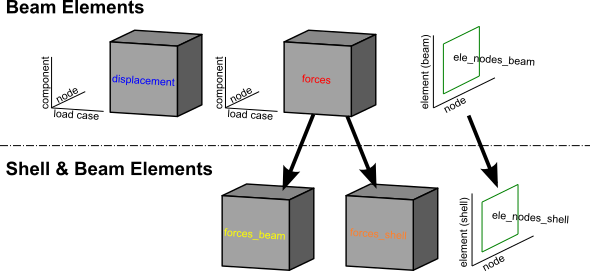
For a Shell & Beam Elements — shell_beam, forces are split into forces_beam / forces_shell
and element connectivity into ele_nodes_beam / ele_nodes_shell.
Printing all_result shows the structure:
<xarray.Dataset>
Dimensions:        (Component: 18, Element: 142, Loadcase: 5, Node: 77, Nodes: 2)
Coordinates:
  * Component      (Component) <U7 'Mx_i' 'Mx_j' 'My_i' ... 'theta_y' 'theta_z'
  * Loadcase       (Loadcase) <U55 'Barrier' ... 'single_moving_point at glob...'
  * Node           (Node) int32 1 2 3 4 5 6 7 8 9 ... 69 70 71 72 73 74 75 76 77
  * Element        (Element) int32 1 2 3 4 5 6 7 ... 136 137 138 139 140 141 142
  * Nodes          (Nodes) <U1 'i' 'j'
Data variables:
    displacements  (Loadcase, Node, Component) float64 nan nan ... -4.996e-10
    forces         (Loadcase, Element, Component) float64 36.18 -156.9 ... nan
    ele_nodes      (Element, Nodes) int32 2 3 1 2 1 3 4 ... 32 75 33 76 34 77 35
Each line of Coordinates lists the labels along one dimension. Loadcase lists
every load case name; Component lists every result quantity; Node and Element
list the integer tags from the OpenSees model.
Figure 1 illustrates the overall dataset structure.
Extracting the data variables#
disp_array = all_result.displacements  # nodal displacements & rotations
force_array = all_result.forces        # element end forces
ele_array   = all_result.ele_nodes     # element→node connectivity
Available force and displacement components#
To see the full list of component labels:
force_array.coords['Component'].values
array(['Mx_i', 'Mx_j', 'My_i', 'My_j', 'Mz_i', 'Mz_j', 'Vx_i', 'Vx_j',
       'Vy_i', 'Vy_j', 'Vz_i', 'Vz_j', 'dx', 'dy', 'dz', 'theta_x',
       'theta_y', 'theta_z'], dtype='<U7')
Suffix _i / _j denotes the start / end node of the element respectively.
Selecting results by label#
Use xarray’s .sel() to pick results by name, and .isel() to pick by integer position:
# All nodes, one component
disp_array.sel(Component='dy')

# One load case, one node
disp_array.sel(Loadcase="patch load case", Node=20)

# One load case, several elements
force_array.sel(Loadcase="Barrier", Element=[2, 3, 4])

# One component across all load cases
force_array.sel(Component='Mz_i')
For results from a Moving load, each increment is stored as a separate load case
named automatically as "<load name> at global position [x,y,z]". You can select
these by full name or by position:
# Select by the auto-generated name
by_name  = force_array.sel(Loadcase="patch load case at global position [0,0,0]")
# Select by integer index (0 = first increment)
by_index = force_array.isel(Loadcase=0)
Note
For information on the full range of indexing and selection operations available on DataArrays, see the xarray indexing documentation.
Getting combinations#
Load combinations are computed on the fly in
get_results() by passing a combinations
dictionary: keys are load case name strings and values are load factors.
ospgrillage multiplies each load case by its factor and sums the results.
comb_dict   = {"patch_load_case": 2, "moving_truck": 1.6}
comb_result = example_bridge.get_results(combinations=comb_dict)
print(comb_result)
<xarray.Dataset>
Dimensions:        (Component: 18, Element: 142, Loadcase: 3, Node: 77, Nodes: 2)
Coordinates:
  * Component      (Component) <U7 'Mx_i' 'Mx_j' 'My_i' ... 'theta_y' 'theta_z'
  * Node           (Node) int32 1 2 3 4 5 6 7 8 9 ... 69 70 71 72 73 74 75 76 77
  * Element        (Element) int32 1 2 3 4 5 6 7 ... 136 137 138 139 140 141 142
  * Nodes          (Nodes) <U1 'i' 'j'
  * Loadcase       (Loadcase) <U55 'moving_truck at global position [2...'
Data variables:
    displacements  (Loadcase, Node, Component) float64 nan nan ... 0.0 7.688e-05
    forces         (Loadcase, Element, Component) float64 36.18 -156.9 ... nan
    ele_nodes      (Loadcase, Element, Nodes) int32 6 9 3 6 ... 228 102 231 105
When a combination mixes static and moving load cases, the factored static load case is added to each increment of the moving load.
Getting load envelope#
A load envelope finds the maximum (or minimum) of a chosen result component across
all load cases. Use create_envelope() to build an
Envelope object, then call .get():
envelope = og.create_envelope(ds=comb_result, load_effect="dy", array="displacements")
disp_env = envelope.get()
print(disp_env)
By default get() returns, for each node, the name of the load case that produced
the maximum value of dy:
<xarray.DataArray 'Loadcase' (Node: 77, Component: 18)>
array([[nan, nan, nan, ...,
        'single_moving_point at global position [2.00,0.00,2.00]', ...],
       ...],
      dtype=object)
Coordinates:
  * Component  (Component) <U7 'Mx_i' 'Mx_j' 'My_i' ... 'theta_y' 'theta_z'
  * Node       (Node) int32 1 2 3 4 5 6 7 8 9 10 ... 69 70 71 72 73 74 75 76 77
For more options see create_envelope().
Getting specific properties of model#
Node#
Use get_nodes() to retrieve node
information from the model.
Element#
Use get_element() to query element
properties and tags from the model.
Plotting results#
Current limitation of OpenSees visualization modules#
OpenSeesPy’s visualization modules (vfo and opsvis) require the model to be
active in the OpenSees model space. Results retrieved via get_results() are stored
in an xarray Dataset and cannot be fed back to these modules for multi-load-case
plotting. Additionally, neither module supports enveloping across multiple incremental
load cases.
For single-load-case inspection only, opsvis can be used directly after analysis:
og.opsv.section_force_diagram_3d('Mz', {}, 1)
Note
opsv only works for model templates beam_only and beam_link. Shell model
plotting is not supported as of ospgrillage version 0.1.0.
ospgrillage post-processing module#
For multi-load-case or moving load results, ospgrillage includes a dedicated post-processing module.
Note
The plotting functions of the post-processing module are at alpha development stage. As of version 0.1.0 they are sufficient for plotting components from xarray DataSets.
For this section, we refer to an exemplar 28 m super-T bridge (Figure 2). The
grillage object is named bridge_28.

To plot deflection from the displacements DataArray use
plot_defo(), specifying a grillage member name:
og.plot_defo(bridge_28, results, member="exterior_main_beam_2", option="nodes")

To plot internal forces from the forces DataArray use
plot_force():
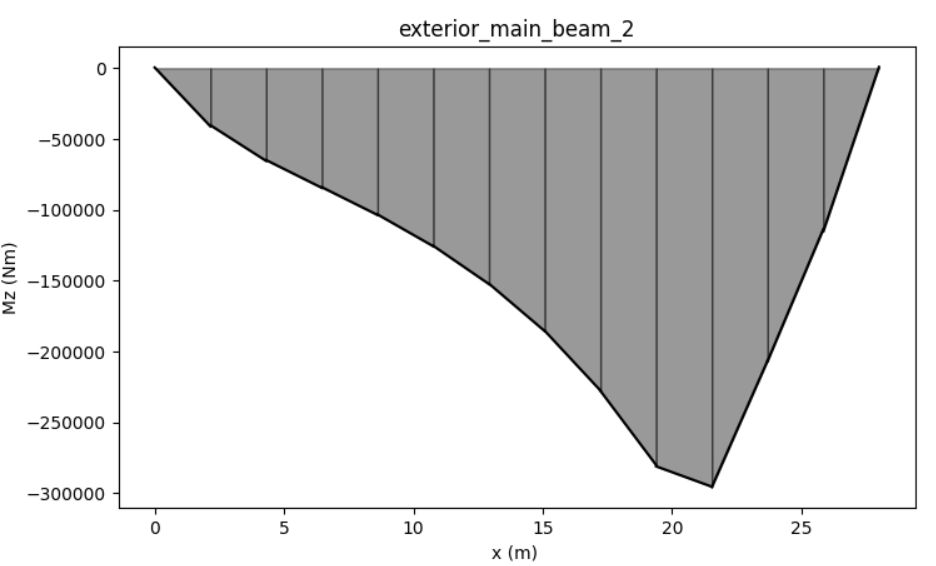
og.plot_force(bridge_28, results, member="exterior_main_beam_2", component="Mz")